Gym Synchronicity
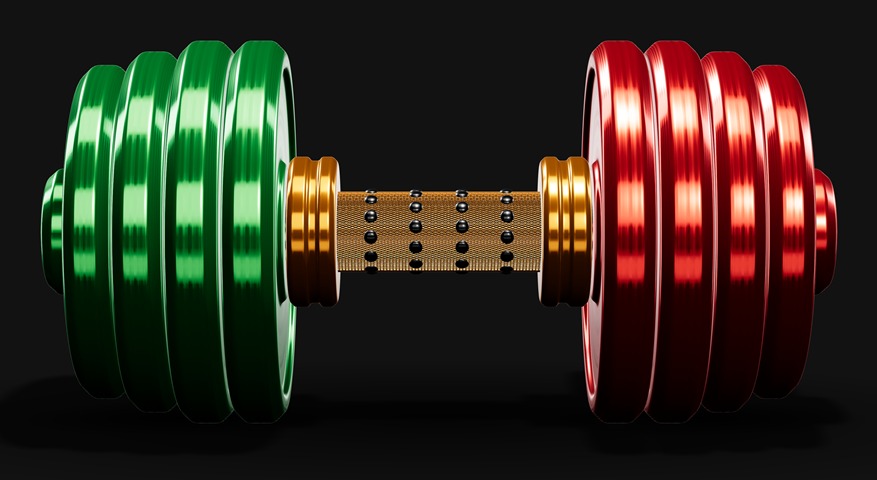
The Gym Synchronicity dumbbell: green plates, an orange bar and red plates.
Evidence-Informed Gym Training App

Gym Synchronicity: honest progress that looks after you.

Stop guessing. Keep progressing.

Gym Synchronicity guides your next session from how your last one went.

Every session compared with your own aims: Green, Orange or Red. A clear next step that you always choose, with your welfare built in and your training data kept on your phone.

Every session compared with your own aims: Green, Orange or Red. A clear next step that you always choose, with your welfare built in and your training data kept on your phone.

Launching soon — join the early-access list below to get your download link first
Coming soon to your phone. Ages 18+ Your training data stays on your phone
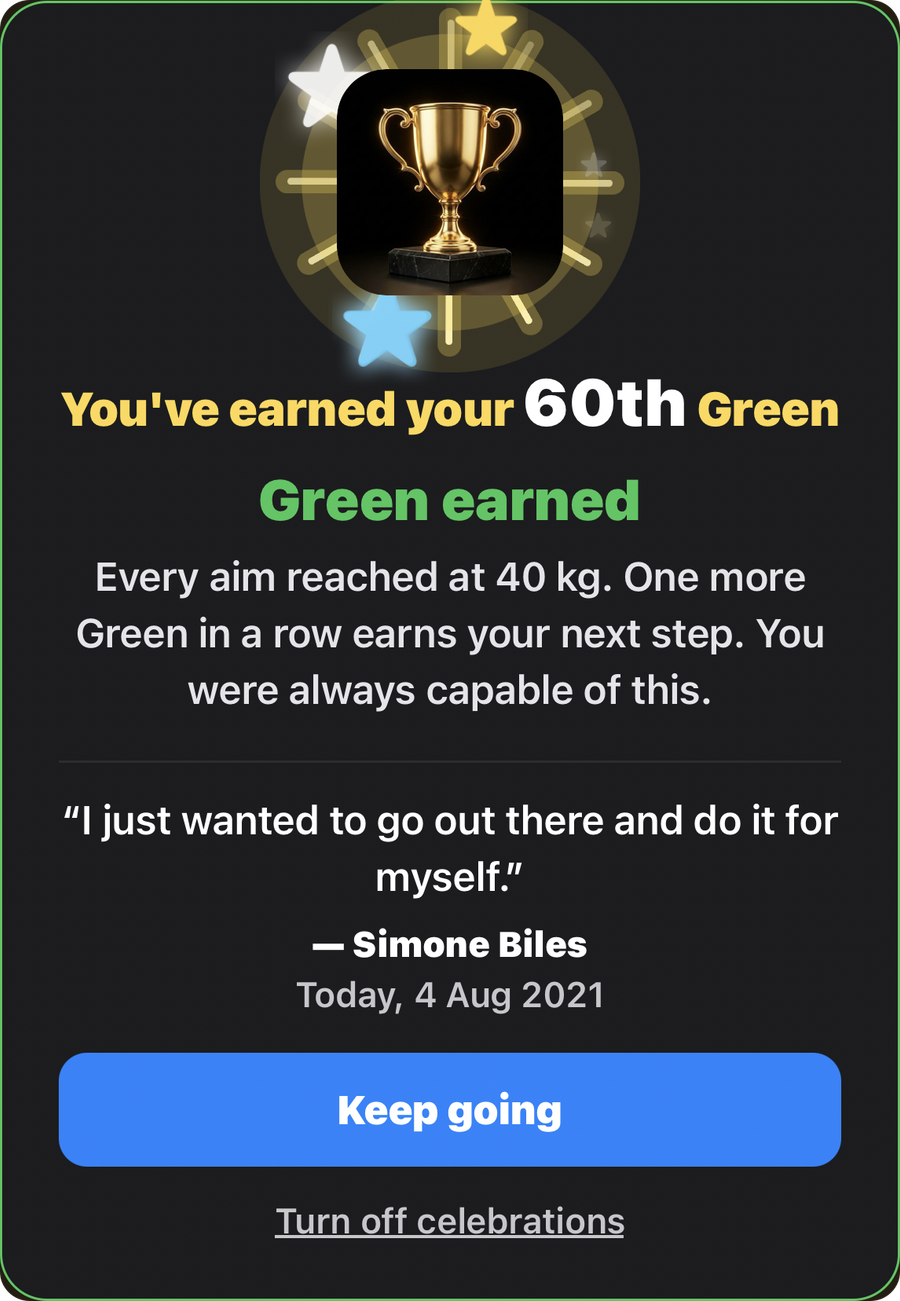
The Green earned card in the app, shown for a test entry: a gold trophy with a gold shimmer and stars, You've earned your 60th Green, Green earned, Every aim reached at 40 kg. One more Green in a row earns your next step. You were always capable of this. A quote from Simone Biles, Today, 4 Aug 2021, with the buttons Keep going and Turn off celebrations.

You earned a Green! Well done, you.

Every aim reached is yours. Your first and second Green in a row each bring a short celebration, with your own Green count, and you get to see how close your next step is.

Your third Green in a row gets the big one: inspiration from athletes and movement teachers, each credited, celebrates your achievement.

Why we celebrate. Progress is quiet. Most of training happens set by set and is easy to miss. A Green means every set reached your aim, so we stop and show you it happened.

Why three in a row? One good session can be a good day. Three in a row at the same weight shows it has become yours. Only then does Gym Synchronicity offer your next step, so you never move on too soon, and it is only an offer. You decide.

Why real words from real people? They are credited quotes from athletes and movement teachers who have worked hard at something too. Your effort is in good company.

Why does it count for YOU? Your aims are your own. There is no streak to lose, no leaderboard and no one to beat. A Green is measured against you alone.

Showing up matters, and Gym Synchronicity counts for YOU as you go.

On Orange and Red days, you get calm words of encouragement instead.

You are in control, always.

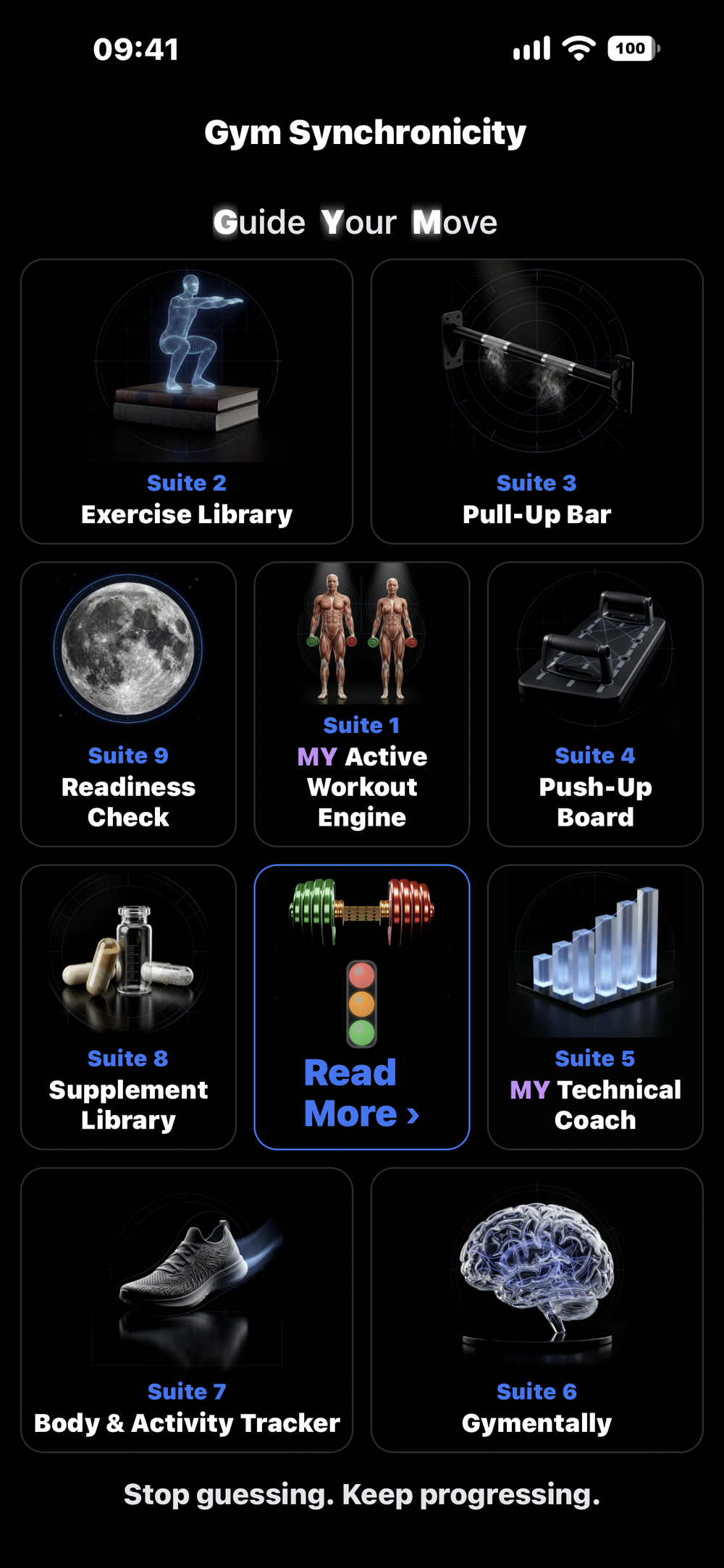
The Gym Synchronicity home screen: Guide Your Move, then nine tiles, Suite 1 to Suite 9, with the dumbbell and traffic light in the middle, and the words Stop guessing. Keep progressing. below.
Where it began

From pen and paper to Gym Synchronicity.

I started the way most of us do: weights and reps written in a notebook with a pen.

Then came spreadsheets, black and white, rows and rows of numbers. Then I started colouring them in: green when I hit every rep, orange when I came close, red when the day beat me. That simple colour told me more at a glance than any column of numbers ever did.

Training at the highest level, I learned to push through the mental strain that demanding training brings, and keep progressing. Most people can't, and shouldn't have to.

So I built what my spreadsheet could never be: a coach that shows you your next step, lets you choose it, and looks after you while you take it.

A KUMAR, founder of Gym Synchronicity
The difference

Most apps just log your workout. Gym Synchronicity helps you understand it.

A notebook records what you did. Gym Synchronicity measures every session against your own aims and shows you where you stand, with a calm next step and a safety net if sessions keep falling well short. It never compares you with anyone else, and you always choose.

Green

Every set reached its aim. Three in a row earns your next step.

Orange

75% or more of your reps. Solid work: stay at this level.

Red

Under 75%. Information, not judgement: a lighter step back, and a word with a professional if it keeps happening.

Inside the app

Eight reasons to keep going with Gym Synchronicity.

Built to turn time in the gym into progress you can see, at your own pace.

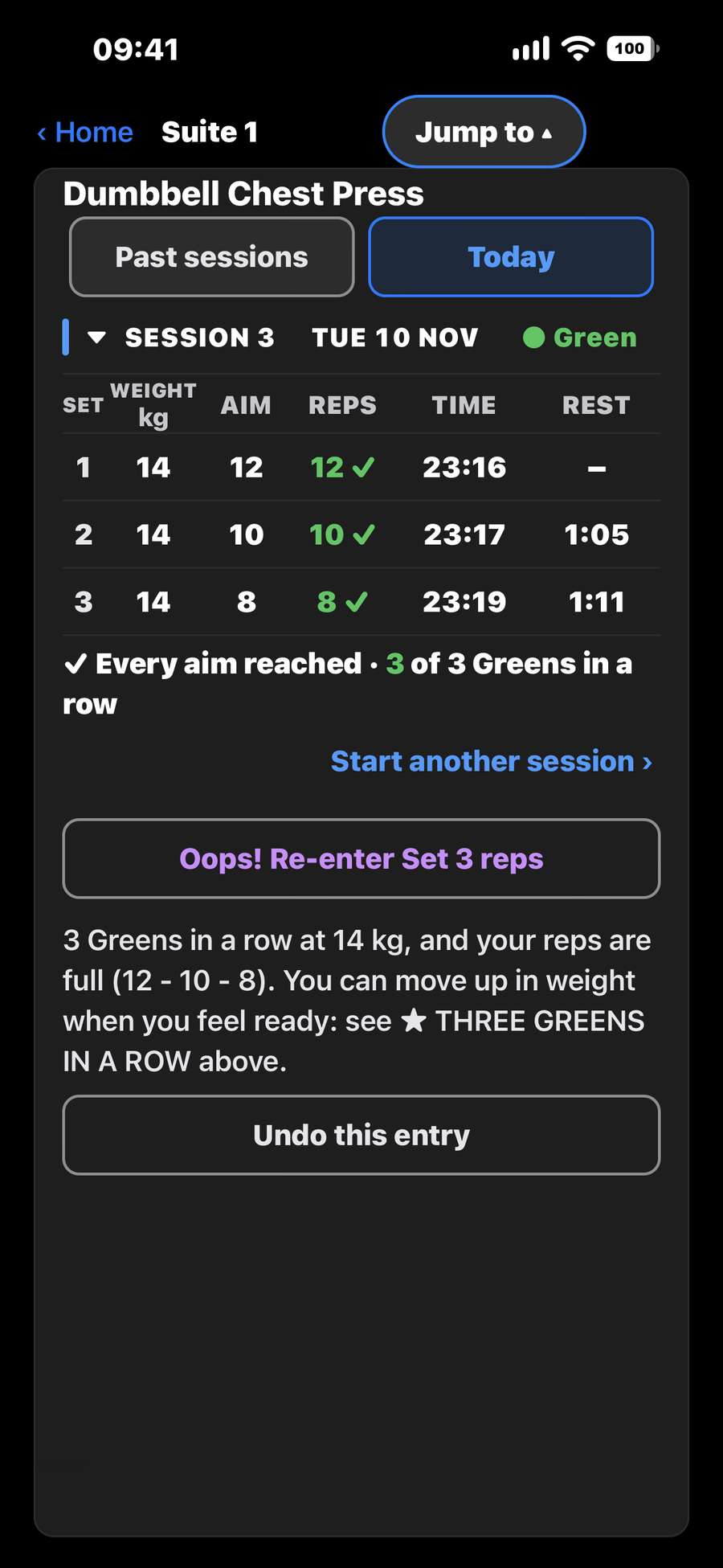
Suite 1, MY Active Workout Engine, showing Dumbbell Chest Press with the Today tab selected: Session 3, Tue 10 Nov, result Green. Three sets at 14 kg with aims of 12, 10 and 8; the reps logged were 12, 10 and 8, each ticked. Every aim reached, 3 of 3 Greens in a row. Below are the buttons Start another session and Undo this entry.
01 — Know where you stand

A clear colour, measured against your own aims

Choose your exercises, set your own aim for each set, then tap in what you did. Green means every set reached its aim, Orange means 75% or more of your reps, Red means under that, which is information, not failure. Reach your aims three sessions in a row and you choose your next step: more reps, or a little more weight.

Your aims, your colour
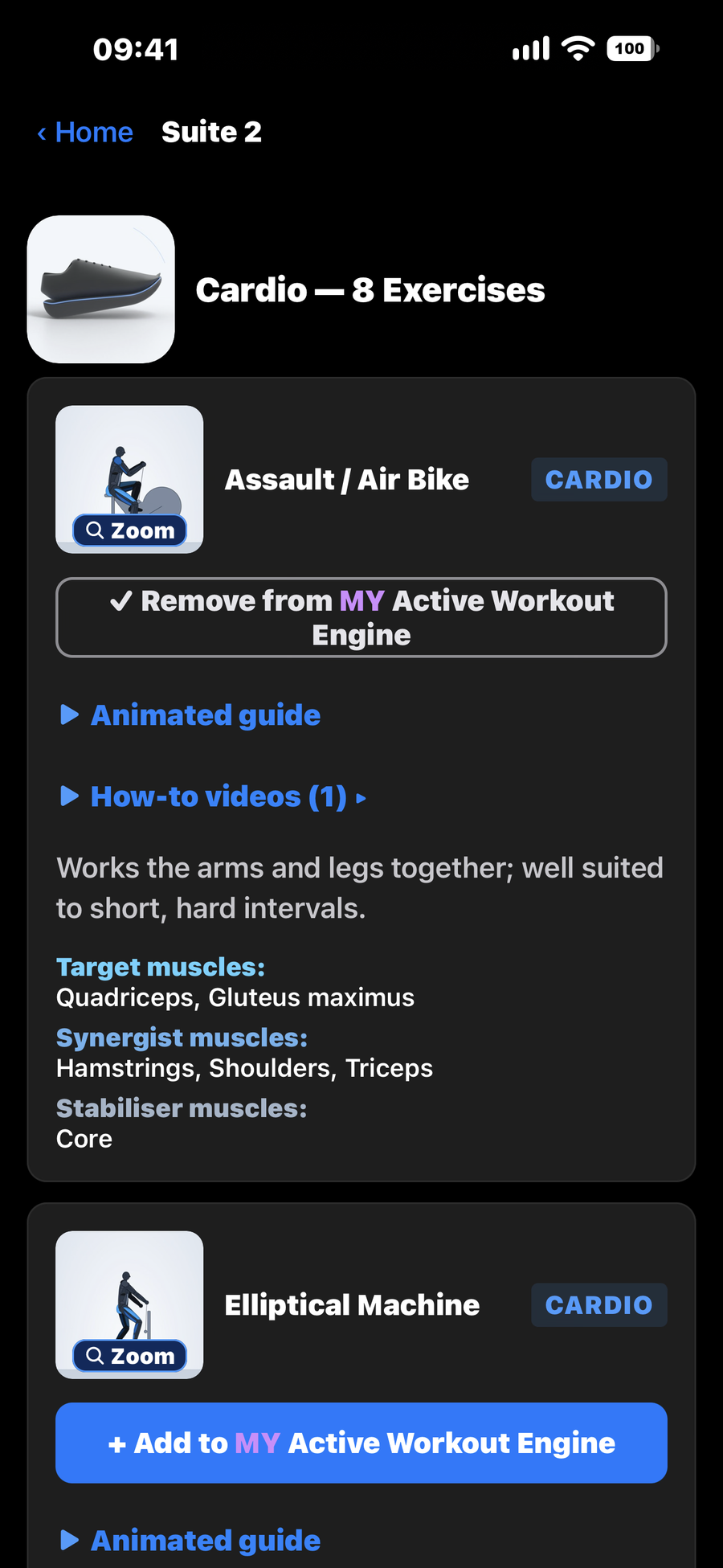
Suite 2, Exercise Library, showing Cardio, 8 Exercises. The Assault / Air Bike card has its picture with a Zoom label, the buttons Remove from MY Active Workout Engine, Animated guide and How-to videos, and its target, synergist and stabiliser muscles. The Elliptical Machine card below has the button Add to MY Active Workout Engine.
02 — See it before you do it

An animated guide for every exercise

Browse 106 exercises (58 strength, 28 conditioning and mobility, 20 yoga) plus the Pull-Up Bar and Push-Up Board guides. Each shows the muscles at work, a picture you can tap to enlarge, and most have how-to videos from qualified coaches, physiotherapists or the equipment makers. Seventeen are marked "Backed by a study", with research that has been checked.

Animated guides, muscles at work
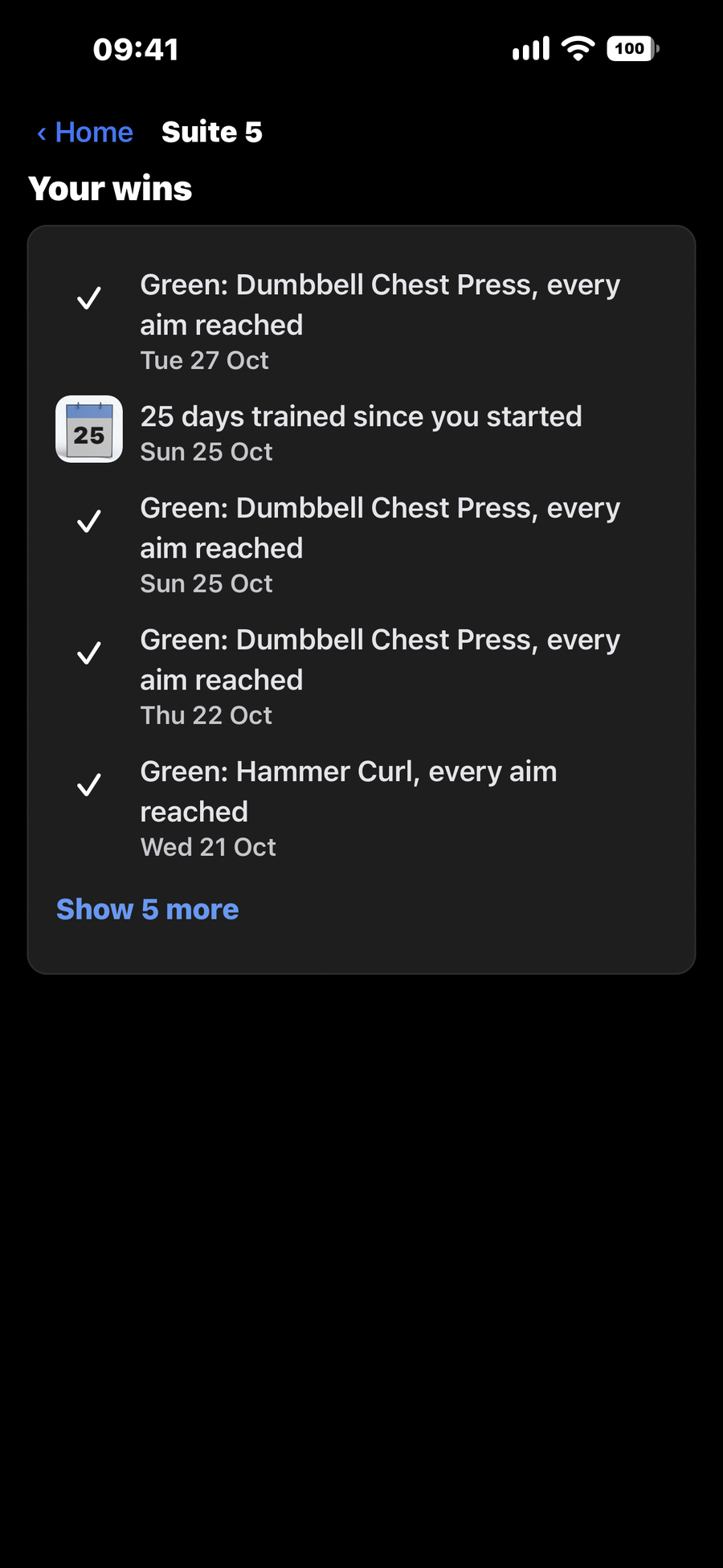
Suite 5, MY Technical Coach, showing Your wins: Green for Dumbbell Chest Press, every aim reached, on Tue 27 Oct, Sun 25 Oct and Thu 22 Oct; Green for Hammer Curl, every aim reached, on Wed 21 Oct; 25 days trained since you started; and a Show 5 more link.
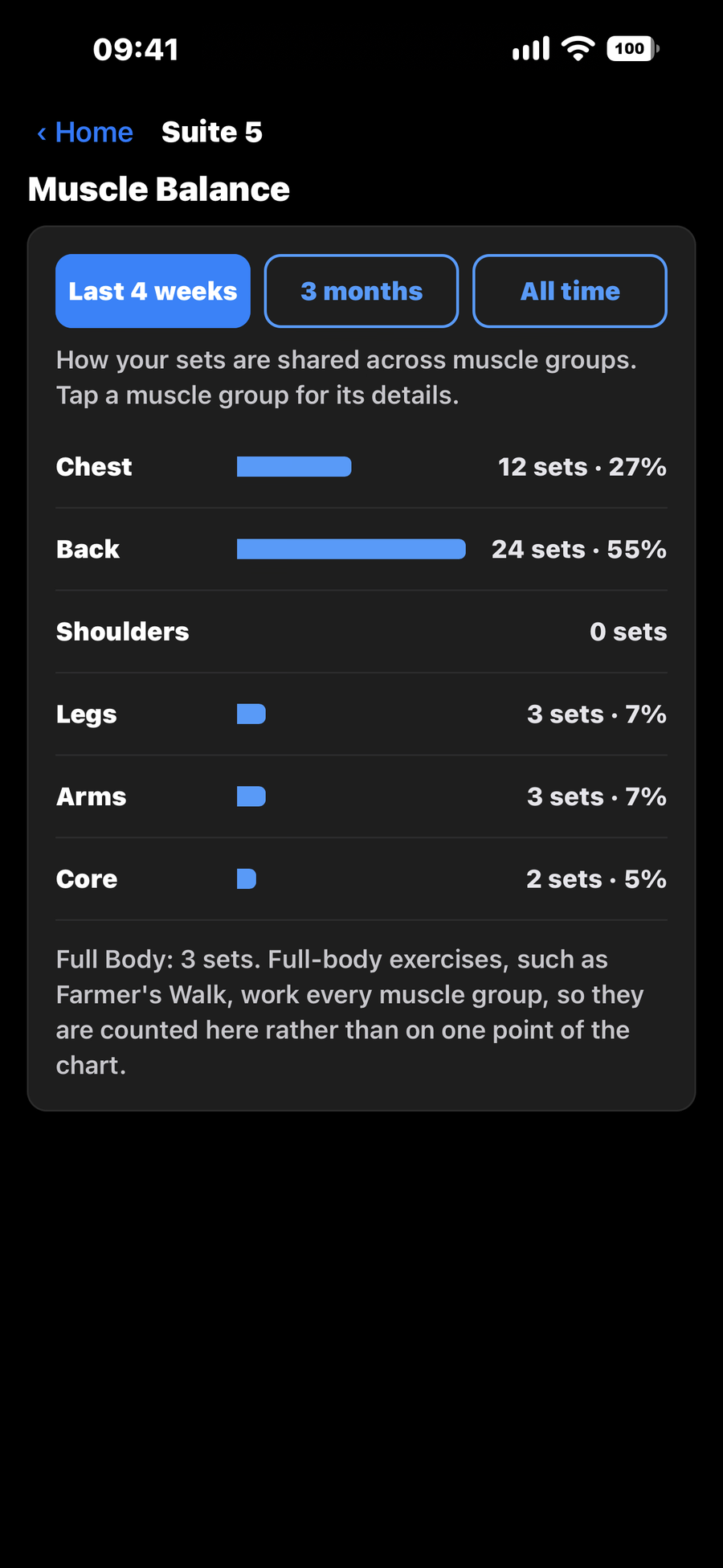
Suite 5, MY Technical Coach, showing Muscle Balance for the last 4 weeks, with the tabs Last 4 weeks, 3 months and All time. Six muscle groups: Chest 12 sets, 27 percent; Back 24 sets, 55 percent; Shoulders 0 sets; Legs 3 sets, 7 percent; Arms 3 sets, 7 percent; Core 2 sets, 5 percent. A note says Full Body: 3 sets, counted beside the chart.
03 — Keep going

MY Technical Coach shows what you have achieved

Where you are now, your wins, what is close, and an optional 4-week plan you set yourself and can change any time. Charts show each day of the month, your strength in every exercise, and how your sets are shared across muscle groups. No daily streak to break and no guilt for a break.

Your wins, noticed
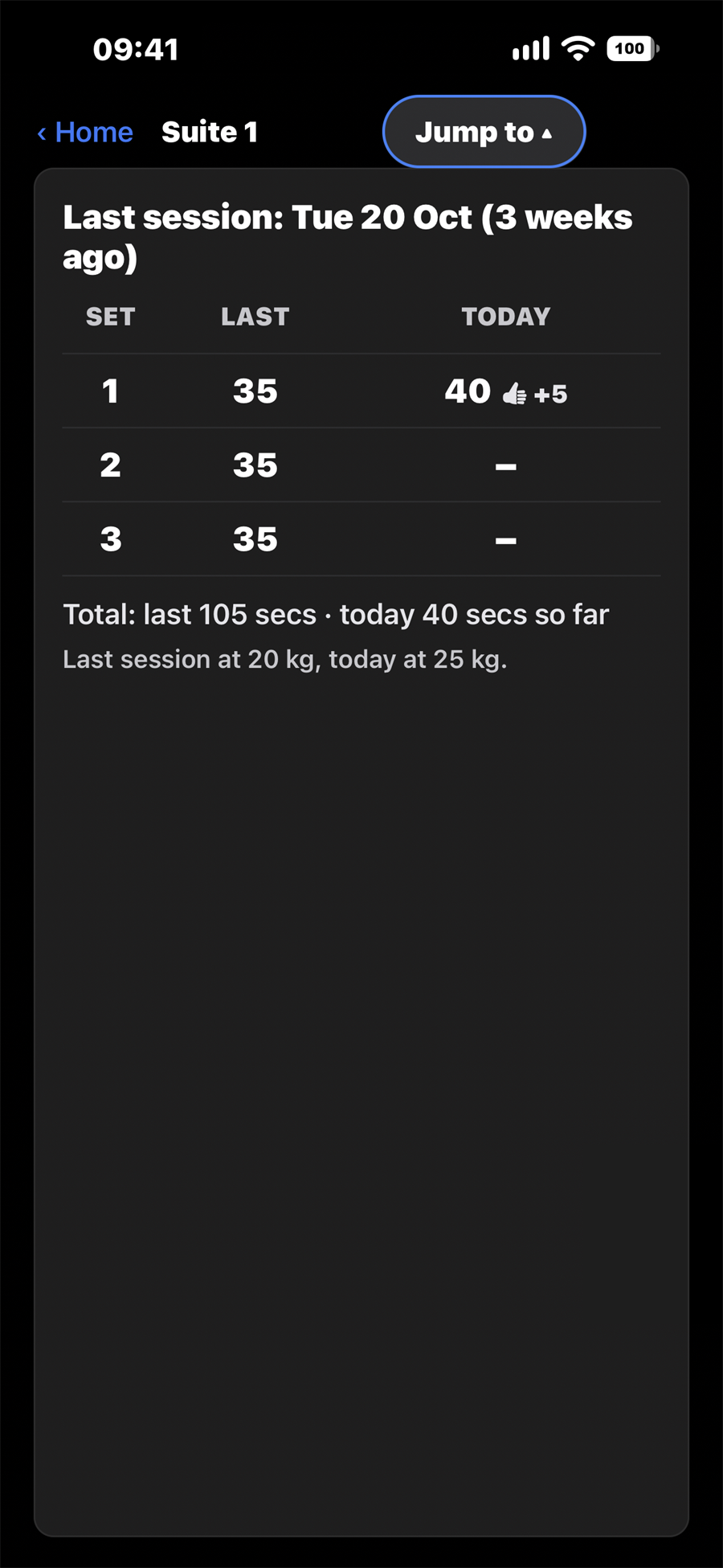
Suite 1, MY Active Workout Engine, showing the Last session card: Last session, Tue 20 Oct, 3 weeks ago. Set 1 was 35 seconds last time and is 40 today, with a thumbs-up and plus 5; sets 2 and 3 are not logged yet. Total: last 105 secs, today 40 secs so far. Last session at 20 kg, today at 25 kg.
04 — Your effort, noticed

Beat your last session, and see it

The "Last session" card shows today against last time, set by set. A thumbs-up when you beat it, a quiet "matched" when you equal it, and plain information, never a red mark, on a harder day. Earn a Green and the app celebrates (you can turn that off in About).

Never a red mark for a hard day
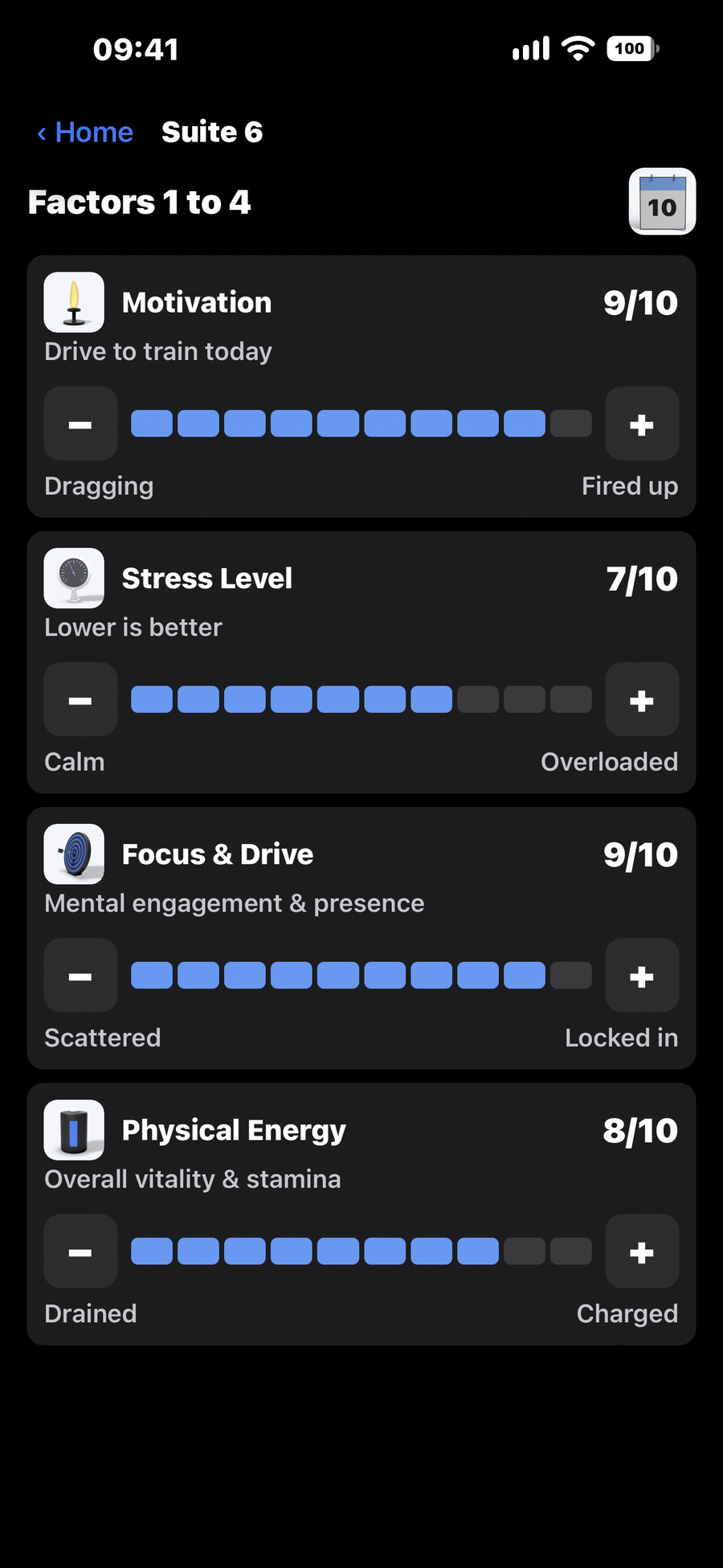
Suite 6, Gymentally, showing Factors 1 to 4 of the eight daily ratings: Motivation 9 out of 10, Stress Level 7 out of 10, Focus and Drive 9 out of 10 and Physical Energy 8 out of 10, each with a bar and minus and plus buttons.
05 — Listen to your body

Gymentally, your daily check-in

One quick daily check-in on eight things (motivation, stress, focus, energy, sleep, soreness, clarity, and hydration and nutrition), your average, and a tip for your lowest rating. When you end a workout, it asks how hard it was, and builds your training load week by week. It is a self-assessment to help you choose how hard to train, not a mental-health tool. If you rate your Stress Level, or your Soreness & Strain, at 6 or more, a card opens with the NHS advice and a link to the NHS page. It stays until you tap that you have read it, and it never stops you saving your check-in.

Know how you feel, then choose
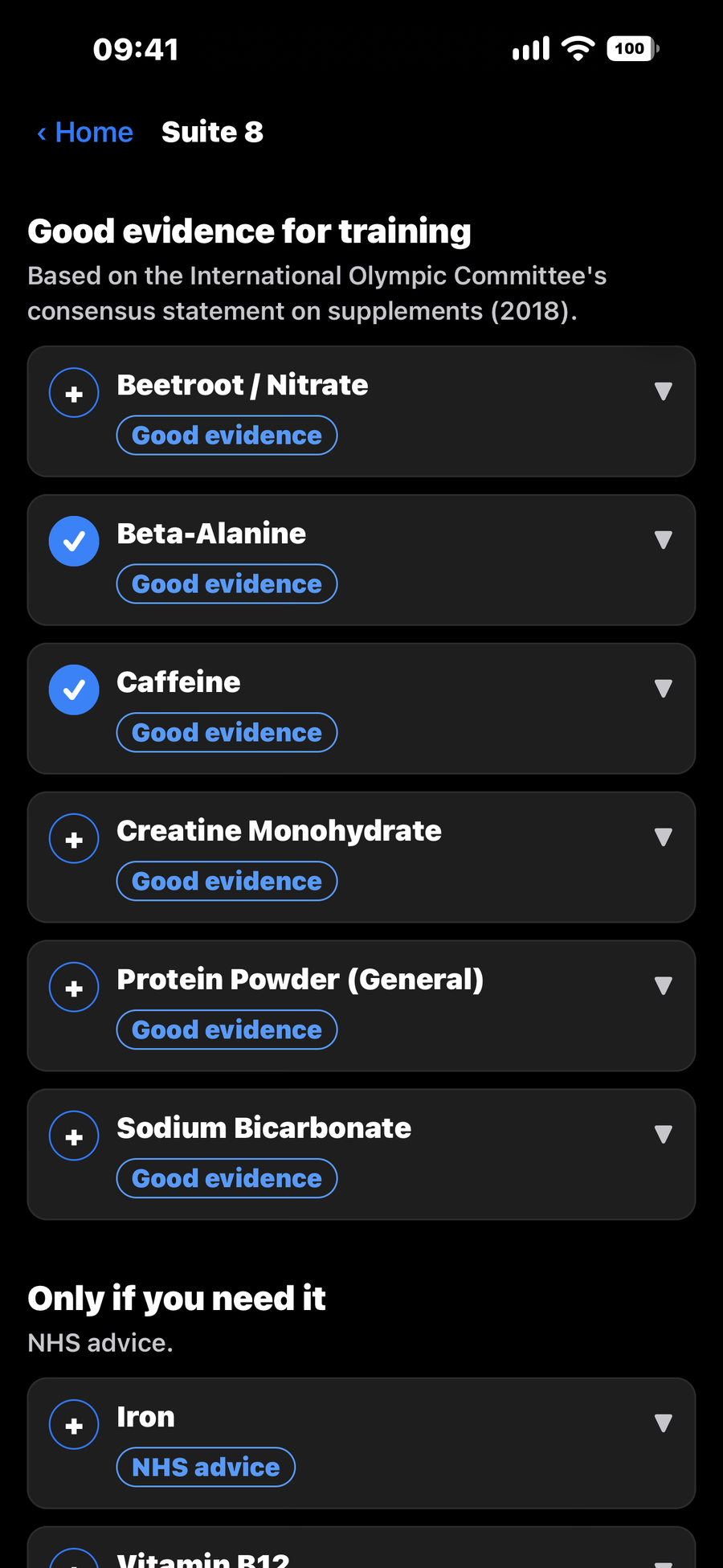
Suite 8, Supplement Library, showing Good evidence for training, based on the International Olympic Committee's consensus statement on supplements (2018): Beetroot / Nitrate, Beta-Alanine, Caffeine, Creatine Monohydrate, Protein Powder (General) and Sodium Bicarbonate, each marked Good evidence, with Beta-Alanine and Caffeine ticked as saved to the list; then Only if you need it, NHS advice, starting with Iron.
06 — Honest about supplements

Food comes first

Six supplements with good evidence for training (International Olympic Committee, 2018) and three to take only if you need them (NHS advice), each with its safety limits. The library lists 167 more, clearly marked as not reviewed, with advice to check with a pharmacist or GP first. Any of the 176 can go on your own list: your choice, always. Save the ones you take for a daily checklist and timing reminders, and tap "I'm training now" to see your own supplements for before, during and after. Gym Synchronicity never sets a dose for you; where it quotes NHS advice or a safe upper limit, it names the source.

176 listed, nine reviewed, no dose set for you
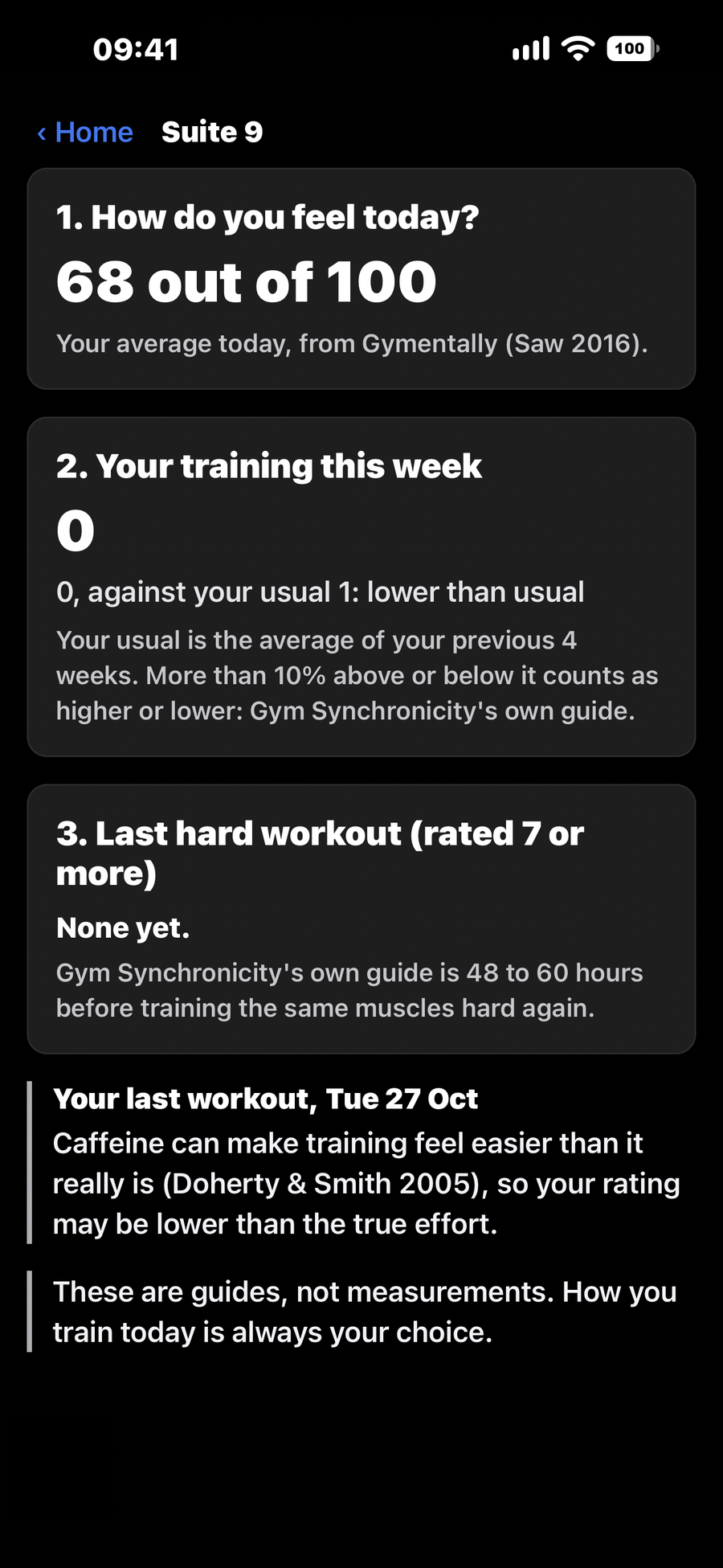
Suite 9, Readiness Check, showing three facts: How do you feel today, 68 out of 100, your average today from Gymentally; Your training this week, 0, against your usual 1, lower than usual; and Last hard workout, rated 7 or more, none yet, with Gym Synchronicity's own guide of 48 to 60 hours. A note on the last workout, Tue 27 Oct, says caffeine can make training feel easier than it really is, and that how you train today is always your choice.
07 — Push or recover

Three facts, kept separate

The Readiness Check shows how you feel today, your training this week against your own usual, and how long since your last hard workout. They are never merged into one score. The 10% band and the 48 to 60 hour guide are Gym Synchronicity's own, and the screen says so.

Your decision, better informed
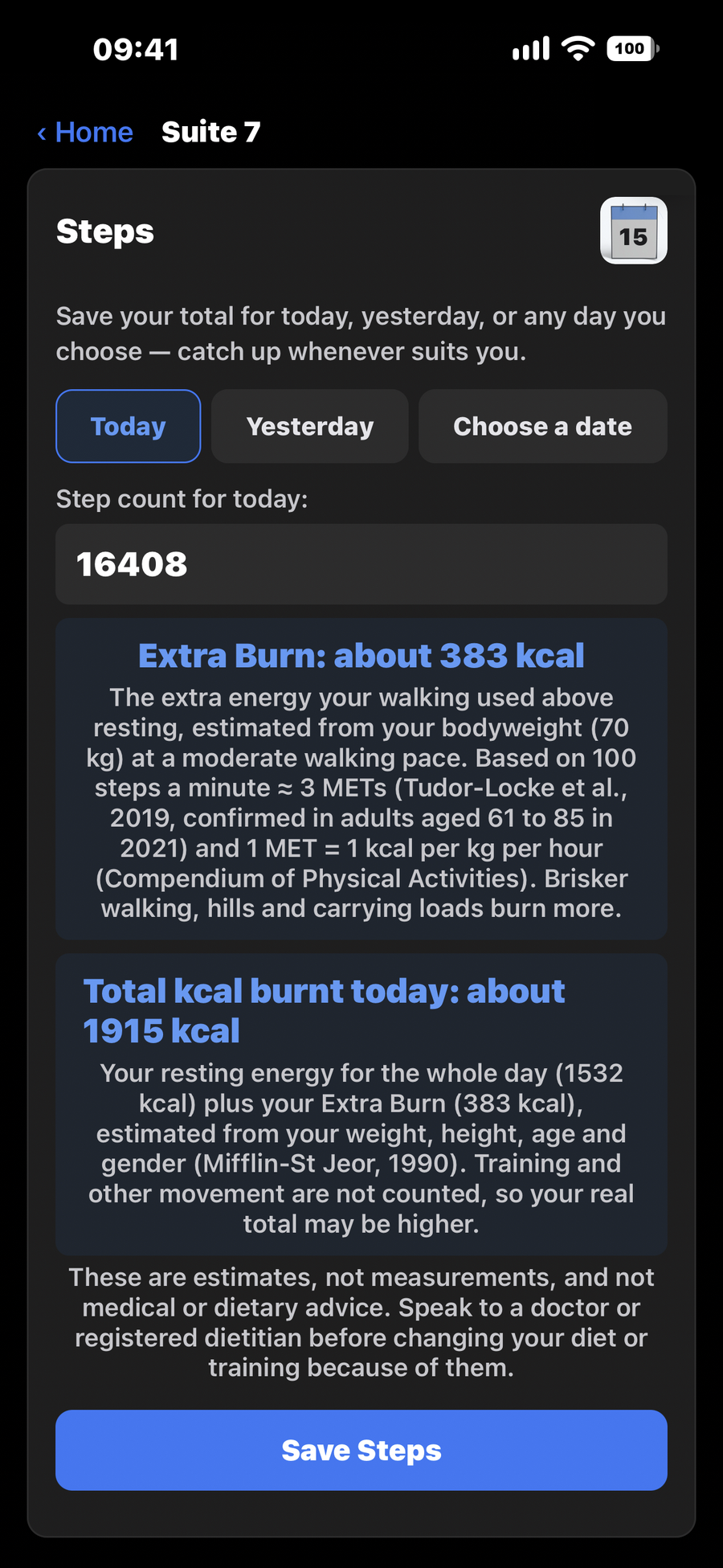
Suite 7, Body and Activity Tracker, the Steps card with Today selected: 16408 steps, Extra Burn about 383 kcal, worked out from a bodyweight of 70 kg, Total kcal burnt today about 1915 kcal, a note that these are estimates, not measurements, and the Save Steps button.
08 — Your whole day

Bodyweight, scale readings and steps

Save a weekly bodyweight and optional readings from a body-composition scale, such as body fat, body water, muscle mass, bone mass, BMR, BMI and visceral fat. Record your daily steps, and see Extra Burn, an estimate of the energy your walking used, worked out from your own weight. Add your height if you like (in cm, m, or ft and in) and Gym Synchronicity also shows Total kcal burnt today: your resting energy for the whole day (Mifflin-St Jeor, 1990) plus your Extra Burn (the energy your walking used above resting). Training and other movement are not counted, so your real total may be higher.

Trends over the year

Progress that looks after you.

Your welfare is built into the training itself. Three Reds in a row pause that muscle group or piece of equipment and ask you to speak to a doctor or another qualified healthcare professional, then you restart 20% lighter once you have the all clear. A big jump in weight asks you to check first, and a safety line is always in view in Suite 1. No wearable is needed: Gym Synchronicity never claims to know how you feel. It shows you the facts, offers the next step, and you decide.

Your data stays yours.

No account. Your training data stays on your phone, and leaves it only if you choose to back it up. No ads and no selling your information. Gym Synchronicity works offline, built for the gym floor. (How-to videos need internet and play through YouTube, which has its own privacy policy.)

How it works

From first set to steady progress in three steps.

STEP 01

Choose your exercises

Pick from the Library, set how many sets you want and your own aim for each, starting from the weight you can train with today.

STEP 02

Tap in each set

Select the reps you did and save. Time and rest fill in automatically.

STEP 03

See where you stand

Green, Orange or Red against your own aims, and a calm next step when you have earned it. You always choose.

Train smart · Progress always

Be first through the door.

Join the early-access list and we'll send your download link the moment Gym Synchronicity goes live. Your 14-day free trial starts when you choose to begin it.

No spam, ever. Unsubscribe in one click. Ages 18+ · See our privacy policy.

Built for the hard days

Nobody talks about the hardest part of the gym: the walk through the door.

The days when fatigue wins the argument, it's raining hard or it's cold outside, when an old niggle whispers not today, when the voice in your head insists everyone in there knows what they're doing except you.

Gym Synchronicity was built for exactly those days. It remembers every session you've done, shows you your next step, always your choice, and — when your results say ease back — it says ease back too, without judgement.

And because the battle is as much in the mind as in the muscles, the app includes Gymentally: one quick daily check-in on eight things (motivation, stress, focus, energy, sleep, soreness, clarity, and hydration and nutrition), with a tip for your lowest rating. It is a self-assessment to help you choose how hard to train, not a mental-health tool.

You don't have to feel confident. You don't have to feel strong. You just have to get through the door, and the app takes it from there: one clear colour, one session, one small win at a time. You were never meant to figure this out alone.

Train Smart. Progress Always.
Simple pricing

Try it free for 14 days. Keep it if it moves you forward.

One subscription, everything included. Cancel anytime — billing is handled securely by the App Store or Google Play.

Monthly
£9.49 / month
Full access, billed monthly.
Best value
Yearly
£63.99 / year
That's about £5.33 a month.
Save 44% vs monthly

14-day free trial · cancel anytime · ages 18+

Deleting the app from your phone does not cancel your subscription. Cancel in your Apple or Google account settings: how to cancel with Apple · how to cancel with Google Play.

More for your training

Explore training gear and articles.

Guides to training gear and home gym equipment, and a Journal of articles written with the same honesty as the app.